
Quick Answer: The best Zoom alternative with whiteboard in 2026 is Convay. Convay Free includes an interactive whiteboard with live annotation built directly into the video conferencing platform — at $0 per user per month. Zoom restricts its whiteboard and annotation tools to paid plans. Convay gives you the full whiteboard experience alongside 55-minute group meetings, screen sharing, and local recording without a subscription.
The Problem With Zoom’s Whiteboard
Zoom Whiteboard exists on the free plan, but its most useful features — annotation tools, persistent boards, and advanced collaboration — are restricted to Zoom Pro and above at $13.33 per user per month. Many teams discover this limitation mid-session when a participant tries to annotate and is met with an upgrade prompt.
Most “Zoom whiteboard alternative” articles list standalone whiteboard apps like Miro or MURAL and leave you to figure out how to run them alongside your video call. That is two separate tools, two browser tabs, two subscriptions, and two points of failure every time your team meets.
The more direct solution is a video conferencing platform that includes a full interactive whiteboard as part of the same session — no tab-switching, no second app, no additional license. In 2026, Convay does this on the free plan. This guide covers the best Zoom alternatives that include whiteboard built-in, followed by the best standalone whiteboard tools for teams that already have a video platform they are keeping.
Part 1 — Zoom Alternatives With Whiteboard Built Into the Meeting
1. Convay — Best Free Video Platform With Built-In Whiteboard
Convay is the strongest Zoom alternative for teams that need whiteboard and annotation built into their video meetings at no cost. Its free plan includes a full interactive whiteboard with live annotation available to all meeting participants — the feature Zoom locks behind a paid plan. Sessions run up to 55 minutes, 37 percent longer than Zoom’s 40-minute free cap, with 100 participants and local recording included.
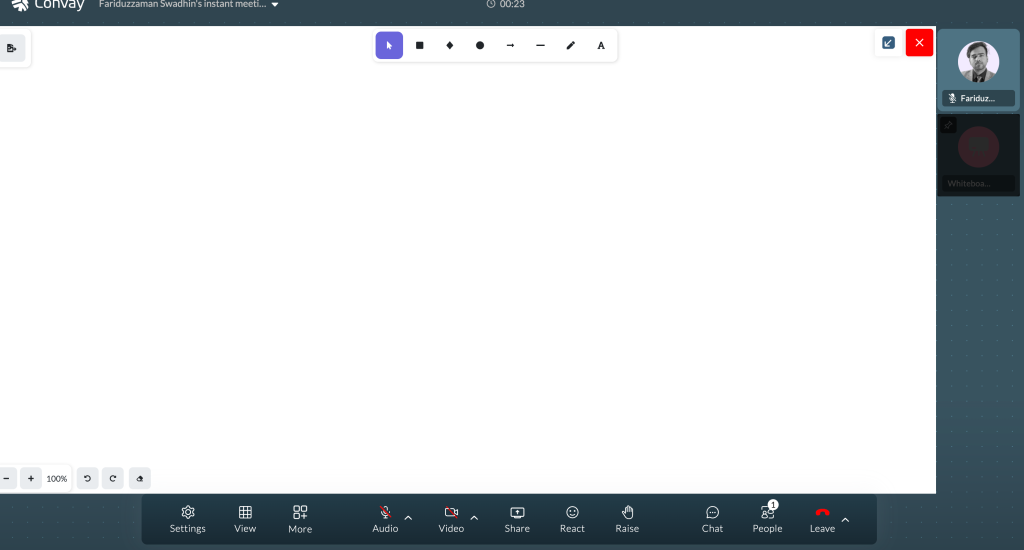
Whiteboard features included free:
- Interactive whiteboard accessible during live meetings
- Live annotation tools for all participants — not just the host
- Screen sharing with annotation overlay
- Real-time collaborative drawing and markup
- Whiteboard content captured in session recording
Why it beats Zoom on whiteboard: Zoom Free restricts annotation and advanced whiteboard features to paid subscribers. Convay Free gives every participant in the meeting full annotation access at $0 per user per month — making it the stronger choice for training sessions, design reviews, collaborative brainstorming, and client presentations.
Paid upgrade path:
- Convay Pro: $9.99/user/month (billed yearly) — 250 participants, sessions up to 30 hours, AI meeting minutes, 10 GB cloud storage
- Convay Business: $16.99/user/month (billed yearly) — 350 participants, sessions up to 38 hours, unlimited AI transcripts, 15 GB storage
Best for: Remote teams, educators, trainers, designers, and small businesses that want video conferencing and whiteboard in one platform without paying for Zoom Pro.
Try Convay Free — no credit card required
2. Microsoft Teams — Best for Microsoft 365 Users
Microsoft Teams includes Microsoft Whiteboard as an integrated feature available during meetings. Teams on Microsoft 365 Business plans get access to a persistent whiteboard that syncs with their Microsoft account and is accessible after the meeting ends. The free Teams tier includes a basic whiteboard with limited collaboration features.
Whiteboard features: Persistent boards that survive beyond the meeting, sticky notes, drawing tools, shape recognition, and integration with other Microsoft apps. Advanced collaboration features require Microsoft 365 paid plans.
Pricing: Teams Free includes basic whiteboard. Microsoft 365 Business Basic at $6 per user per month unlocks more comprehensive whiteboard capabilities alongside cloud recording and calendar scheduling.
Limitation: Microsoft Whiteboard on the free Teams tier is more restricted than Convay Free’s built-in whiteboard. Full persistent board features require a Microsoft 365 subscription. Teams also has a steeper onboarding curve than Convay for non-Microsoft users.
Best for: Organizations already on Microsoft 365 that want whiteboard capability within their existing Teams environment.
3. Cisco Webex — Best Whiteboard for Enterprise and Government
Cisco Webex includes a built-in whiteboard in its meeting platform on all paid plans. Webex Whiteboards persist beyond the meeting, can be shared with participants who were not in the original session, and integrate with Webex’s broader collaboration tools. For regulated industries, Webex whiteboards operate on the same DISA-certified infrastructure as the meetings themselves.
Whiteboard features: Persistent whiteboards accessible post-meeting, sticky notes, freehand drawing, shape recognition, multi-user simultaneous annotation, and sharing with non-meeting participants.
Pricing: Webex Free includes basic whiteboard. Webex Starter at $14.50 per user per month unlocks persistent boards and advanced collaboration features.
Best for: Enterprise organizations and government agencies that need whiteboard on DISA-certified, FedRAMP-authorized infrastructure.
4. Google Meet (with Google Workspace) — Best for Google Ecosystem
Google Meet integrates with Google Jamboard’s successor tools within Google Workspace. Note that standalone Google Jamboard was discontinued in December 2024. Teams on paid Google Workspace plans can access collaborative whiteboard features through integrated Google tools. The free Google Meet tier does not include whiteboard functionality.
Whiteboard features: Available on paid Google Workspace plans. Integrates with Google Drive for persistent storage. Real-time collaboration with all Workspace users.
Pricing: Not available on free Google Meet. Google Workspace Business Starter at $6 per user per month provides access to collaborative workspace tools.
Limitation: No free whiteboard in Google Meet. Teams that need free whiteboard within video conferencing should use Convay instead.
Best for: Organizations already paying for Google Workspace who want whiteboard without adding a third-party tool.
Part 2 — Standalone Whiteboard Tools for Teams Keeping Their Video Platform
If you already have a video conferencing platform and only need a better whiteboard tool, the following standalone options are the strongest choices in 2026.
5. Miro — Best Standalone Whiteboard for Large Teams
Miro is the most widely used standalone virtual whiteboard platform in 2026. Its infinite canvas, 2,500+ pre-built templates, and deep integrations with Slack, Jira, Asana, GitHub, and Zoom make it the standard choice for product teams, agile ceremonies, and design sprints. It operates as a separate tool from your video call — you share your Miro board via screen share during meetings.
Key features: Infinite canvas, 2,500+ templates (retrospectives, user story maps, customer journey maps, flowcharts, wireframes), real-time multi-user collaboration, sticky notes, voting and prioritization tools, Jira and Asana integration, and timer tools for facilitated workshops.
Pricing: Free plan includes 3 editable boards (unlimited viewers). Starter at $8 per user per month (unlimited boards). Business at $16 per user per month adds advanced collaboration and admin controls. Enterprise pricing available.
Limitation: Miro is a separate application from your video platform. Running Miro alongside Zoom or another video tool requires two browser windows or apps simultaneously — adding friction that Convay’s built-in whiteboard eliminates.
Best for: Product teams, agile teams, UX researchers, and design teams that need template-driven facilitation tools beyond what built-in video platform whiteboards offer.
6. FigJam — Best Whiteboard for Design and Product Teams
FigJam is Figma’s whiteboard tool designed specifically for product and design workflows. It integrates natively with Figma files — teams can move components directly between FigJam brainstorming sessions and Figma design files. It includes templates for design critiques, sprint planning, user journey mapping, and product roadmaps.
Key features: Native Figma file integration, design-specific templates, sticky notes, emoji reactions, stamps, voting dots, and real-time cursor presence for all collaborators.
Pricing: Free for up to 3 FigJam files. Figma Professional at $12 per editor per month (includes FigJam) unlocks unlimited files. Figma Organization at $45 per editor per month adds SSO and advanced admin.
Best for: Product and design teams already using Figma who want whiteboard sessions that connect directly to their design workflow.
7. MURAL — Best for Enterprise Workshop Facilitation
MURAL is a structured collaboration platform built for enterprise facilitation. It includes a library of facilitation templates, guided workshop flows, and a facilitator mode that guides participants step-by-step through structured exercises. It is used by consulting firms, enterprise L&D teams, and innovation programs that run recurring structured workshops.
Key features: Facilitation mode with step-by-step guidance, 300+ workshop templates, timer and voting tools, permission controls for large groups, SSO and enterprise security, and integrations with Microsoft Teams and Slack.
Pricing: Free plan includes 5 murals. Team+ at $9.99 per user per month (unlimited murals). Business at $17.99 per user per month adds SSO and advanced controls.
Best for: Consulting firms, enterprise L&D teams, and facilitators running structured workshops, design thinking sessions, and innovation programs at scale.
8. Lucidspark — Best Whiteboard for Process and Flowchart Teams
Lucidspark is the whiteboard companion to Lucidchart, optimized for teams that frequently create process flows, org charts, and structured diagrams alongside freeform brainstorming. It allows seamless movement between unstructured whiteboard ideation and structured Lucidchart diagram creation in the same workflow.
Key features: Freehand drawing, sticky notes, voting, breakout boards, Lucidchart integration for structured diagrams, and templates for process mapping and agile ceremonies.
Pricing: Free plan includes 3 editable documents. Individual at $7.95 per month. Team at $9 per user per month.
Best for: Operations, process improvement, and engineering teams that move between brainstorming and structured flowchart or diagram creation.
Table 1: Zoom Alternatives With Whiteboard — Built-In vs Standalone
| Platform | Whiteboard Type | Free Whiteboard | Live Annotation (Free) | Video Meeting Included | Free Meeting Limit | Starting Paid Price |
|---|---|---|---|---|---|---|
| Convay | Built-in (video + whiteboard) | Yes — full | Yes — all participants | Yes | 55 minutes | $9.99/user/mo |
| Microsoft Teams | Built-in (basic free) | Basic only | Limited (free) | Yes | Unlimited | $6/user/mo |
| Cisco Webex | Built-in (paid) | Basic only | Paid only | Yes | 40 min (group) | $14.50/user/mo |
| Google Meet | Workspace tools (paid) | No | No (free) | Yes | Unlimited | $6/user/mo |
| Miro | Standalone only | Yes (3 boards) | Yes | No | — | $8/user/mo |
| FigJam | Standalone only | Yes (3 files) | Yes | No | — | $12/editor/mo |
| MURAL | Standalone only | Yes (5 murals) | Yes | No | — | $9.99/user/mo |
| Lucidspark | Standalone only | Yes (3 docs) | Yes | No | — | $7.95/mo |
| Zoom (baseline) | Built-in (paid features) | Limited | Paid only | Yes | 40 minutes | $13.33/user/mo |
Convay is the only platform on this list that includes both a full interactive whiteboard with live annotation for all participants and video conferencing — all at $0 per user per month. Every other video platform on this list restricts free whiteboard or annotation features. Every standalone whiteboard tool requires a separate video conferencing subscription running alongside it.
Table 2: Zoom Whiteboard vs Convay Whiteboard — Side-by-Side
| Feature | Zoom Free | Zoom Pro ($13.33/user/mo) | Convay Free | Convay Pro ($9.99/user/mo) |
|---|---|---|---|---|
| Interactive whiteboard | Limited | Full | Full — free | Full |
| Live annotation for participants | Restricted | Yes | Yes — all participants free | Yes |
| Whiteboard in recording | Paid plan | Yes | Yes — included free | Yes |
| Persistent whiteboard (post-meeting) | Paid plan | Yes | Limited | Yes |
| Screen share + annotation | Paid plan | Yes | Yes — free | Yes |
| Meeting duration (free) | 40 minutes | Unlimited | 55 minutes | Up to 30 hours |
| Participants (free) | 100 | 100 | 100 | 250 |
| AI meeting minutes | No (add-on) | Add-on cost | Limited | Yes — included |
| Price | $0 | $13.33/user/mo | $0 | $9.99/user/mo |
At the free tier, Convay gives you full whiteboard and annotation while Zoom limits both. At the paid tier, Convay Pro at $9.99 is 25 percent cheaper than Zoom Pro at $13.33 and includes AI meeting minutes that Zoom charges as a separate add-on.
Table 3: Which Whiteboard Option Fits Your Use Case
| Your Situation | Best Option | Why | Cost |
|---|---|---|---|
| Need whiteboard + video in one free tool | Convay Free | Only free platform with full interactive whiteboard and live annotation built into video conferencing. No second app or subscription needed. | $0/user/mo |
| Need whiteboard + video with AI meeting notes | Convay Pro | Full whiteboard, 250 participants, sessions up to 30 hours, and AI meeting minutes — 25% cheaper than Zoom Pro with more included. | $9.99/user/mo (yearly) |
| Already on Microsoft 365, need whiteboard in meetings | Microsoft Teams | Microsoft Whiteboard integrates natively with Teams. Persistent boards accessible post-meeting. No additional subscription needed. | Included in M365 |
| Product team running design sprints and agile ceremonies | Miro | 2,500+ templates for sprints, retrospectives, user story maps. Jira and Asana integration. Deeper template library than any video platform’s built-in whiteboard. | $8/user/mo (unlimited boards) |
| Design team in Figma ecosystem | FigJam | Native Figma file integration. Move components between FigJam sessions and Figma designs without exporting. Ideal for design critique and product brainstorming. | $12/editor/mo (with Figma) |
| Enterprise L&D or consulting team running structured workshops | MURAL | Facilitation mode with step-by-step guidance. 300+ workshop templates for design thinking, innovation, and training programs. Built for repeated structured facilitation at scale. | $9.99/user/mo |
| Operations team mapping processes and flowcharts | Lucidspark | Seamless integration with Lucidchart for moving from unstructured brainstorm to structured process diagram in the same workflow. | $7.95/mo (individual) |
| Government or regulated enterprise needing compliant whiteboard | Cisco Webex | Whiteboard operates on DISA-certified, FedRAMP-authorized infrastructure. Persistent boards with enterprise security controls. Required for regulated sectors. | $14.50/user/mo |
Frequently Asked Questions
What is the best free Zoom alternative with whiteboard?
Convay is the best free Zoom alternative with whiteboard in 2026. Its free plan includes a full interactive whiteboard with live annotation for all participants, video meetings up to 55 minutes, screen sharing, and local recording — all at $0 per user per month. Zoom restricts whiteboard annotation to paid plans. Google Meet does not include whiteboard on its free tier.
Does Zoom have a free whiteboard?
Zoom includes a basic whiteboard on its free plan, but annotation tools, persistent boards, and advanced collaboration features are restricted to Zoom Pro at $13.33 per user per month. Free users encounter upgrade prompts when attempting to use annotation during meetings. Convay Free includes a full interactive whiteboard with live annotation for all participants at no cost.
What happened to Google Jamboard?
Google discontinued Jamboard in December 2024. It is no longer available as a standalone product. Google Workspace users can access collaborative whiteboard tools through integrated Google Workspace features on paid plans. Teams that relied on Jamboard should consider Convay Free for a free whiteboard within video conferencing, or Miro and FigJam for standalone whiteboard tools.
Can I use Miro with Zoom for free?
Yes. Miro’s free plan includes 3 editable boards that can be shared via screen share during Zoom meetings. However, this requires running two separate applications simultaneously — Zoom for the video call and Miro for the whiteboard. Convay eliminates this by including whiteboard directly inside the video meeting at no cost, without the need for a second application.
Which video conferencing platform includes the best whiteboard?
Convay includes the strongest free built-in whiteboard among video conferencing platforms in 2026 — full interactive whiteboard with live annotation for all participants at $0 per user per month. Microsoft Teams includes Microsoft Whiteboard on paid Microsoft 365 plans. Cisco Webex includes persistent whiteboards on paid plans. Zoom restricts annotation and advanced whiteboard to paid tiers.
Is there a free alternative to Miro?
Miro’s free plan includes 3 editable boards at no cost. FigJam offers 3 free files for design and product teams. MURAL offers 5 free murals. If you need whiteboard within a video call rather than as a standalone tool, Convay Free includes an interactive whiteboard with live annotation built into the meeting platform at $0 per user per month — eliminating the need for Miro alongside a separate video conferencing subscription.
What is the difference between a virtual whiteboard and a meeting platform whiteboard?
A standalone virtual whiteboard like Miro or FigJam is a dedicated collaboration canvas that operates independently of your video call. You share it via screen during a meeting. A meeting platform whiteboard like Convay’s is built directly into the video session — all participants can annotate simultaneously without switching applications, and the whiteboard session is captured in the meeting recording automatically.
