Your CISO approved the webinar platform three years ago. Security landscape changed. Threats evolved. Compliance requirements tightened. The platform didn’t.
Last week, unauthorized participants joined a confidential strategy session. Investigation revealed: weak domain authentication, no participant verification, generic meeting links shared via email that anyone could forward. The platform worked fine for 2021 needs. It’s inadequate for 2025 threats.
Webinar security failures aren’t theoretical. They’re documented incidents affecting government agencies, financial institutions, healthcare organizations, and enterprises. Deepfake infiltration. Social engineering penetration. Cross-border data exposure. Zero-day vulnerabilities exploited during high-stakes virtual events.
The attack surface expanded. Hybrid work normalized large-scale virtual meetings discussing classified information, proprietary strategy, confidential negotiations, policy decisions. Webinar platforms transitioned from convenience tools to critical infrastructure requiring enterprise security architecture.
This checklist provides CISOs, security teams, and GovTech leaders with comprehensive evaluation criteria for secure webinar platforms. Not marketing claims—technical requirements backed by incident analysis, compliance frameworks, and threat modeling.
What this checklist covers:
- 10 security domains CISOs must evaluate
- Technical requirements with red flags to avoid
- Compliance alignment for regulated industries
- Comparative analysis across platforms
- Government and enterprise security scenarios
- 2025 threat landscape considerations
Why Security Failures in Webinar Platforms Are Escalating (2023-2025 Trends)
Rise in Meeting Impersonation and Phishing
Attackers craft convincing fake meeting invitations mimicking legitimate webinar platforms. Recipients click malicious links believing they’re joining official events. Credentials get stolen. Networks get compromised.
In 2024, a financial services firm lost $2.3M when attackers impersonated a vendor webinar invitation, stealing executive credentials used to authorize fraudulent transactions. The fake meeting link was indistinguishable from legitimate Zoom invitations.
Exploits in Major Collaboration Platforms
CVE-2023-39144: Zoom zero-day allowing unauthorized access to meetings
CVE-2024-21413: Microsoft Teams exploitation enabling link injection
CVE-2023-34362: Webex vulnerability exposing meeting content
These aren’t theoretical vulnerabilities. They were actively exploited before patches deployed. Organizations running unpatched platforms experienced unauthorized access to confidential meetings.
Compliance Tightening Globally
GDPR (Europe): €20M fines for data protection violations
NIS2 Directive (EU): Critical infrastructure security requirements
Digital Personal Data Protection Act (India): Local data residency mandates
Bangladesh Data Protection Act: Government data must remain within borders
UAE Data Protection Law: Regional data center requirements
Kenya Data Protection Act: Cross-border transfer restrictions
Legacy webinar platforms designed for US markets struggle meeting these varied requirements. Cloud-only architectures can’t satisfy data residency mandates. Centralized key management violates zero-knowledge security requirements.
Hybrid/Remote Government Workflows Expanding Attack Surface
Government operations increasingly occur virtually. Cabinet meetings via video conference. Parliamentary committees using webinars. Public consultations hosting thousands of citizens online. Each creates attack vectors:
Unauthorized access: Participants joining restricted government discussions
Data exfiltration: Meeting recordings stolen from insecure cloud storage
Eavesdropping: Unencrypted transmission intercepted by state actors
Social engineering: Fake participants extracting classified information
Real Incident: A European government agency discovered unauthorized attendees in confidential budget allocation meeting. Investigation revealed: generic meeting link forwarded externally, no domain verification, insufficient access controls. Sensitive fiscal information leaked to media before official announcement.
The platform’s security model assumed all participants were trustworthy. Government operations can’t make that assumption.
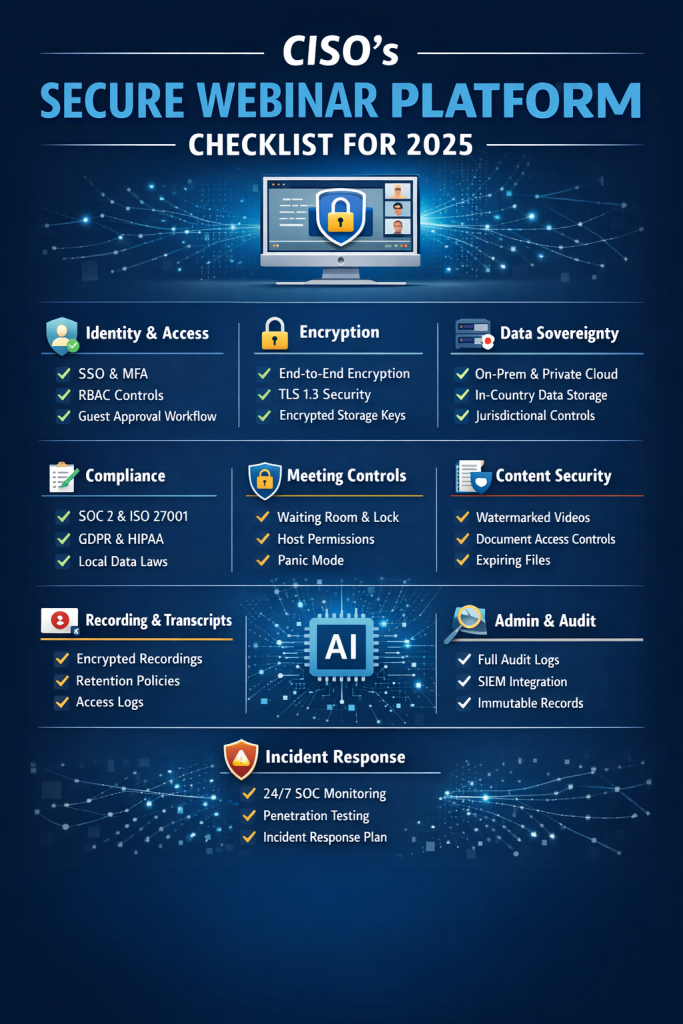
The 2025 Secure Webinar Platform Checklist (CISO-Centric)
1. Identity & Access Security
What CISOs Must Require:
Single Sign-On (SSO) Integration: SAML 2.0, OAuth 2.0, OpenID Connect support. Users authenticate through organizational identity provider (Azure AD, Okta, OneLogin). No separate credentials. Centralized access control.
Multi-Factor Authentication (MFA) Enforcement: Platform must enforce MFA at organizational level. Not optional. Not user-configured. Administratively required. SMS codes insufficient—TOTP, hardware tokens, or biometric authentication.
Domain and Email Whitelisting: Restrict meeting access to specific domains. Finance committee meeting? Only @finance.gov.bd addresses can join. No exceptions. No guest access circumventing domain controls.
Role-Based Access Control (RBAC): Hierarchical permissions matching organizational structure. Ministry-level admins. Department-level managers. Meeting-level hosts. Each with appropriate privileges. No flat permission models where every user has identical access.
Automatic Participant Verification: System verifies identity at join time. Authentication doesn’t end at login—it continues throughout session. User authentication expires? Automatic removal from meeting.
Guest Access Restrictions: If external participants necessary, explicit approval workflow required. Sponsor from organization vouches for guest. Time-limited access. Revocable immediately. Complete audit trail.
Watermarked Attendee Identity: Participant name and email visible in screenshots and recordings. Deters unauthorized recording. Enables leak source identification.
Red Flags to Avoid:
❌ MFA optional instead of mandatory
❌ Generic meeting links without identity verification
❌ No integration with enterprise identity providers
❌ Absent audit trails showing who joined when
❌ Guest access enabled by default without approval
❌ Inability to restrict access by domain or organizational unit
2. Encryption Standards
Mandatory Requirements:
End-to-End Encryption (E2EE): Content encrypted on sender device, decrypted only on recipient device. Server cannot access plaintext. Platform vendor cannot access content. True zero-knowledge security.
Critical distinction: “Encrypted in transit and at rest” ≠ end-to-end encryption. Former means vendor controls keys and can decrypt. Latter means customers control keys.
TLS 1.3 Transport Encryption: All communication uses latest transport security. TLS 1.2 acceptable only if organization has legacy system constraints. TLS 1.0/1.1 unacceptable—known vulnerabilities.
Encrypted Storage for Recordings: Recordings encrypted at rest with customer-controlled keys. Vendor cannot decrypt. Government controls encryption keys, not platform provider.
Encrypted Breakout Rooms: Small group discussions receive same encryption protection as main session. Common vulnerability: platforms encrypt main meeting but not breakouts.
Secure Key Management: Customer controls encryption keys. Ideally, customer manages key rotation. At minimum, keys stored in customer-controlled hardware security module (HSM), not vendor cloud.
Advanced (Government/Defense Requirements):
Hardware-Level Root of Trust: Encryption keys derived from hardware security modules physically controlled by customer. Software-only encryption insufficient for classified environments.
Per-Stream Encryption Segmentation: Each video/audio stream independently encrypted. Compromise of one stream doesn’t expose others. Defense-in-depth architecture.
Red Flags:
❌ Vendor-controlled encryption keys
❌ Absence of E2EE option
❌ No documentation of cryptographic implementation
❌ TLS 1.0/1.1 still supported
❌ Unencrypted breakout rooms or private chats
❌ Encryption “in transit” only (not at rest)
3. Data Residency & Digital Sovereignty
What CISOs Look For:
Local Data Storage: All meeting data—recordings, transcripts, chat logs, files, analytics, metadata—stored within national boundaries. Not “primarily in region X with cross-border replication.” Exclusively local.
Deployment Options:
- On-Premise: Platform runs on customer infrastructure. Complete control. Zero external dependencies.
- National Cloud: Government or nationally-controlled cloud infrastructure. Data sovereignty maintained without customer managing hardware.
- Private Cloud: Dedicated cloud instance for single customer within national boundaries.
- Hybrid: Combination of above based on sensitivity classification.
Government-Grade Isolation: No multi-tenant infrastructure where government data coexists with commercial customers. Dedicated resources. Physical or logical segregation meeting government security standards.
Jurisdictional Independence: Platform accessible without foreign infrastructure dependencies. If international submarine cables cut, platform remains operational using national networks.
Risk if Absent:
Foreign Cloud Jurisdiction: Data stored on US cloud infrastructure subject to CLOUD Act, Patriot Act, FISA provisions. Foreign government can subpoena your meeting recordings without your knowledge.
Cross-Border Data Exposure: Meeting discussing national security strategy routes through Singapore, Sydney, Oregon servers before returning to participants in same city. Each transit point = potential interception.
Compliance Violations: Bangladesh Data Protection Act requires government data remain within borders. Cloud-only platform violates law regardless of vendor assurances. Constitutional exposure, not just regulatory risk.
Vendor Access: Even encrypted data stored on vendor infrastructure creates keys-under-doormat problem. Vendor has technical capability to access content even if they promise not to.
Convay Differentiator (Implied Through Architecture):
On-premise and national cloud deployment options provide true data sovereignty. Government controls infrastructure. Encryption keys never leave national boundaries. Constitutional-level security through architecture, not policy.
4. Compliance Requirements (2025-Updated)
Your Platform Must Support:
ISO 27001: Information security management system certification. Regular audits. Documented security controls. Continuous improvement process.
SOC 2 Type II: Independent audit of security, availability, processing integrity, confidentiality, privacy controls over defined period (typically 12 months). Type I insufficient—only point-in-time snapshot.
GDPR Compliance (Europe): Data protection impact assessments. Data processing agreements. Right to erasure. Data portability. Breach notification within 72 hours.
Local Data Protection Acts: Bangladesh DPDPA, India DPDP Act, Kenya DPA, UAE data protection law. Each has specific requirements around consent, data residency, cross-border transfers.
HIPAA (Healthcare): Business Associate Agreement (BAA). Administrative, physical, technical safeguards. Encryption. Access controls. Audit trails. Breach notification.
Financial Regulations: Banking-grade logging. Transaction-level audit trails. Immutable logs. Long-term retention (often 7-10 years). Tamper-evident storage.
FedRAMP / GovCloud Equivalents: For government cloud deployments. Continuous monitoring. Security assessment. Authorization to operate. National equivalents in countries with government cloud frameworks.
CISO Checklist Questions:
✓ Does vendor provide signed Business Associate Agreements for HIPAA?
✓ Are audit logs tamper-proof with cryptographic verification?
✓ Can meeting recordings be access-controlled by organizational role?
✓ Does platform support data retention policies matching legal requirements?
✓ Are data processing agreements customizable for jurisdictional needs?
✓ Can platform demonstrate compliance through third-party audits?
✓ Does vendor maintain security certifications continuously, not just at launch?
Red Flags:
❌ Self-certification without third-party audits
❌ “Working towards” compliance instead of currently certified
❌ Generic data processing agreements non-customizable for jurisdiction
❌ Inability to provide compliance documentation for procurement
❌ Compliance claims without audit reports to verify
5. Meeting Security Controls (Live Event Protection)
Must-Have Features:
Lobby/Waiting Room: All participants enter holding area before host admits. Prevents unauthorized joining. Host reviews participant list, removes suspicious entries before admitting to main meeting.
Lock Meeting: Once all expected participants joined, host locks meeting preventing additional joins. Protects against meeting link forwarding after start.
Remove Participant Instantly: Host can remove disruptive or unauthorized participant immediately without warning dialog. Removed participant cannot rejoin. Permanent ban option.
Granular Permission Controls:
- Disable participant video individually or globally
- Mute participant audio with prevent-unmute option
- Disable file transfer for security-sensitive meetings
- Restrict private chat (disable completely or host-only)
- Prevent screen sharing by participants
- Disable recording by participants (host-only recording)
Host Transfer and Co-Host Roles: Meeting control transferable to backup facilitator if primary host experiences technical issues. Co-hosts can assist with moderation without full host privileges.
Panic Mode (Emergency Lockdown): Single-click security override:
- Mutes all participants
- Disables video
- Locks meeting
- Stops recording
- Clears chat
- Notifications to security team
For crisis situations where meeting security compromised.
Large Webinar Controls (3,000-10,000 Attendees):
Controlled Q&A: Questions submitted to moderator queue. Moderator approves before visible to audience. Prevents spam, inappropriate content, social engineering attempts.
Chat Throttling: Rate limiting on messages. Prevents chat flooding. Protects against denial-of-service attacks via rapid message spam.
Moderator Approval Workflow: All participant actions—unmute requests, screen share requests, reactions—require moderator approval for high-security events.
Attendee Verification at Scale: Domain verification still enforced even with thousands of participants. Whitelist enforcement doesn’t degrade with audience size.
6. Confidentiality of Shared Content
Your Platform Must Support:
Watermarked Screen Shares: Participant name and email overlaid on shared screens visible in their view. Different attendees see different watermarks. Screenshots traceable to source if leaked.
Watermarked Recordings: Same principle for recordings. Each viewer’s playback includes their identity watermark. Recording leaked externally? Source identifiable through watermark forensics.
Secure Document Sharing: Files shared within platform encrypted and access-controlled. Recipients cannot forward files outside meeting context. Download logging tracks who accessed which files when.
Automatic Redaction for Sensitive Keywords: AI identifies and suggests redaction of sensitive information—social security numbers, credit card numbers, classified markings, API keys—before recording distribution.
Controlled Downloads: Administrator controls whether recordings and files can be downloaded or only viewed online. If downloads permitted, detailed logging of who downloaded what when.
Expiring Content: Shared documents and recordings can have automatic expiration. Strategic planning meeting shared with department heads? Access expires 30 days post-meeting. Prevents indefinite sensitive information persistence.
Digital Rights Management (DRM): For highly sensitive content, DRM prevents screenshots, screen recording, or content extraction even if participant has viewing access.
7. Recording & Transcript Security
Secure Lifecycle Requirements:
At-Rest Encryption: Recordings encrypted immediately upon creation. Encryption keys customer-controlled. Recordings stored in customer-specified location (on-premise, national cloud, private cloud).
Access Logs for Every Playback: Complete audit trail showing who accessed which recording when. Not just “recording viewed 37 times” but “John.Smith@ministry.gov viewed recording on 2025-01-15 14:32 from IP 10.24.5.18 for 42 minutes.”
Role-Based Access Policies: Meeting sensitivity determines who can access recording. Confidential budget discussion? Only Budget Committee members. Public hearing? Anyone in organization.
On-Premise or Sovereign Storage: Government and regulated industries require recordings remain on national infrastructure. Cloud-only platforms violate data residency requirements.
Auto-Deletion or Retention Schedules: Compliance often requires retention (7-10 years financial, 3-5 years standard) but also deletion after retention period. Platform must support automated lifecycle management.
Encrypted Transcript Generation: AI transcription occurs locally or in controlled environment. Audio doesn’t transmit to foreign cloud AI services for processing. Transcript stored encrypted with same controls as recording.
Version Control and Tamper Detection: Recordings cryptographically signed. Any modification detectable. Chain of custody maintained for legal proceedings or investigations.
Risk:
Recorded meetings are primary leak vectors. Executives discussing M&A strategy. Government agencies planning policy. Financial institutions reviewing confidential analysis. Unsecured recordings on cloud storage become journalist sources or competitor intelligence.
8. AI & Real-Time Processing Security
2025 Challenge: AI-powered meetings introduce new attack surfaces. Transcription. Translation. Sentiment analysis. Meeting summaries. Each requires processing sensitive audio and video.
CISO Checklist:
Local AI Inference: Does AI/machine learning run on customer infrastructure or platform servers within customer’s data boundary? Or does audio stream to foreign cloud for inference?
Cross-Border Voice Data: Is voice data sent internationally for processing? Many platforms use US-based AI services even when meetings occur elsewhere. Voice data crosses borders, potentially violating data residency requirements.
Raw Audio Storage: Does AI processing require storing raw audio files? Or can it operate on ephemeral streams without persistent storage? Minimizing data retention reduces risk.
Translation Security: For multilingual meetings, translation must occur securely. Sending meeting audio to third-party translation services creates data exposure.
Training Data Privacy: Does vendor use your meeting data for AI model training? Even if “anonymized,” sensitive patterns can emerge. Opt-out insufficient—must be contractually prohibited.
Model Update Security: How does platform update AI models? Automatic updates might introduce vulnerabilities. Government deployments often require change control over AI model updates.
Convay Advantage (Implied Through Architecture):
Local AI inference option keeps audio processing within national boundaries. Bengali and English transcription runs on customer infrastructure. No cross-border data transmission for AI features.
9. Admin Governance & Auditability
Admin Dashboard Must Include:
Full Meeting Logs: Complete record of all meetings—time, duration, participants, host, meeting type, sensitivity classification.
Participant Join/Leave Trails: Timestamped record of every participant joining and leaving. Identifies late joiners or early departures from confidential discussions.
Action Logs: Every host action recorded:
- Participant muted/unmuted
- Participant removed
- Meeting locked
- Recording started/stopped
- Screen share enabled/disabled
- File shared
- Poll created/results
- Breakout rooms created/closed
Audit Export Capabilities: Logs exportable in standard formats (CSV, JSON, SIEM-compatible). Must include all fields needed for forensic analysis or compliance audits.
SIEM Integration: Direct integration with Security Information and Event Management systems (Splunk, ELK Stack, Azure Sentinel, IBM QRadar). Real-time security monitoring and alerting.
User Activity Reports: Which users host most meetings? Which access sensitive recordings frequently? Which share files externally? Behavioral analysis for insider threat detection.
Compliance Dashboards: Visualization showing compliance status—which meetings recorded per policy, which participants verified, which recordings archived per retention schedule.
Government & BFSI Requirement:
Immutable Logs: Audit logs cryptographically signed. Modifications detectable. Chain of custody maintained. Logs stored securely for 7-10 years minimum.
Retention Control: Organizational policy determines retention periods. Platform enforces automatically. Legal hold capability prevents deletion during investigations.
10. Incident Response & Security Operations
CISO Essentials:
Vulnerability Disclosure Program: Public security contact. Responsible disclosure process. Bug bounty program incentivizing researcher reporting. Transparent communication about identified vulnerabilities.
Regular Penetration Testing: Annual third-party penetration testing at minimum. Quarterly for critical systems. Results shared with enterprise customers. Remediation timelines documented.
Zero-Day Response Capability: How quickly can vendor patch critical vulnerabilities? SLA for emergency security updates. Communication protocol during active exploits.
Distributed Denial-of-Service (DDoS) Protection: Platform resilient against DDoS attacks. Enterprise customers shouldn’t experience outages because platform under attack. Mitigation capacity appropriate to customer size.
24/7 SOC Contact: Security Operations Center contact for security incidents. Not general support queue. Direct escalation path for active security events.
Incident Response Playbook: Documented procedures for various incident types. Data breach response. Unauthorized access. DDoS attack. Ransomware. Customer knows what to expect during incidents.
Threat Intelligence Sharing: Platform vendor shares threat intelligence with customers. “We’re observing increased phishing attempts using fake meeting invitations—here’s the indicators.”
Security Advisory Notifications: Proactive communication about security updates, patches, new threats. Customers shouldn’t learn about vulnerabilities from media reports.
Red Flags:
❌ No vulnerability disclosure program
❌ Security issues reported via general support email
❌ Absence of penetration testing documentation
❌ Slow patch deployment (weeks to address critical issues)
❌ No security contact information published
❌ Incident response communication limited to enterprise tier
Comparative Summary: What Secure Platforms Offer vs Legacy Tools
| Security Domain | Convay | Zoom | Webex | Teams | ON24 |
|---|---|---|---|---|---|
| Data Sovereignty | ✅ Full (On-prem/National) | ❌ Cloud only | ⚠️ Limited | ❌ Cloud only | ❌ Cloud only |
| Customer-Controlled Encryption | ✅ Yes | ❌ No | ⚠️ Limited | ❌ No | ❌ No |
| On-Premise Deployment | ✅ Yes | ❌ No | ⚠️ Hybrid only | ❌ No | ❌ No |
| Local AI Processing | ✅ Yes | ❌ No | ❌ No | ❌ No | ❌ No |
| Fine-Grained RBAC | ✅ Yes | ⚠️ Basic | ✅ Yes | ⚠️ Basic | ⚠️ Basic |
| Immutable Audit Logs | ✅ Yes | ⚠️ Standard | ✅ Yes | ⚠️ Standard | ⚠️ Standard |
| Domain Whitelisting | ✅ Yes | ✅ Yes | ✅ Yes | ✅ Yes | ⚠️ Limited |
| Watermarked Content | ✅ Yes | ❌ No | ❌ No | ❌ No | ⚠️ Limited |
| Panic Mode | ✅ Yes | ❌ No | ❌ No | ❌ No | ❌ No |
| E2EE for Large Events | ✅ Yes | ⚠️ Limited | ⚠️ Limited | ⚠️ Limited | ❌ No |
| Government Certifications | ✅ ISO/CMMI | ✅ Multiple | ✅ Multiple | ✅ Multiple | ⚠️ Limited |
| Network Resilience | ✅ On-prem option | ⚠️ Cloud-dependent | ⚠️ Cloud-dependent | ⚠️ Cloud-dependent | ⚠️ Cloud-dependent |
Key Differentiators:
Convay’s architecture prioritizes sovereignty and zero-knowledge security through on-premise deployment options. Legacy platforms optimize for cloud convenience, creating structural limitations around data residency, customer-controlled encryption, and local AI processing.
Full 2025 CISO Evaluation Checklist
1. Identity & Access Control
- Enterprise SSO support (SAML 2.0, OAuth 2.0, OpenID Connect)
- Enforced multi-factor authentication (MFA) for all privileged roles
- Domain and email allowlisting
- Role-based access control (RBAC) for hosts, moderators, speakers, attendees
- Automatic participant identity verification
- Guest access with approval or pre-registration workflow
- Visible, non-removable identity watermarking for attendees
CISO check: If identity is weak, all other controls are bypassable.
2. Encryption & Key Management
- End-to-end encryption (E2EE) option for live sessions
- TLS 1.3 encryption for data in transit
- Encryption at rest with customer-managed keys (BYOK/KMS)
- Encrypted breakout rooms and private chats
- Hardware Security Module (HSM) integration
- Per-stream encryption isolation
CISO check: Encryption must be paired with access governance and logging.
3. Data Sovereignty & Deployment Models
- On-premises deployment option
- Sovereign or national cloud deployment
- Private cloud deployment
- Enforced data residency (storage + processing in-country)
- Jurisdictional independence from foreign legal access
- Government-grade isolation (no shared multi-tenancy)
CISO check: Verify where data is processed—not just stored.
4. Compliance & Regulatory Readiness
- ISO/IEC 27001 certification
- SOC 2 Type II audit reports
- GDPR compliance (DPA, breach notification timelines)
- Alignment with local data protection laws
- HIPAA compliance with BAA (healthcare use cases)
- Financial regulatory compliance (BFSI environments)
- Government or national cloud certifications
CISO check: Certifications should be current and independently audited.
5. Meeting & Webinar Security Controls
- Waiting room / lobby enforcement
- Lock meeting or webinar functionality
- Instant participant removal
- Granular permissions (audio, video, chat, screen sharing)
- Host transfer and co-host roles
- Emergency lockdown (“panic mode”)
- Large-scale moderation (Q&A, chat throttling, hand-raise control)
CISO check: Controls must scale to large, high-risk events.
6. Content & Intellectual Property Protection
- Watermarked screen sharing
- Watermarked recordings
- Secure document sharing with access controls
- Automatic sensitive-data redaction
- Controlled downloads with full logging
- Expiring content and access windows
- Digital Rights Management (DRM) enforcement
CISO check: Content leakage risk often exceeds live-meeting risk.
7. Recording & Transcript Governance
- Encryption at rest using customer-managed keys
- Playback and download access logs
- Role-based access policies
- On-prem or sovereign storage options
- Automated retention and deletion schedules
- Encrypted transcript generation
- Version control and tamper detection
CISO check: Recordings create long-term compliance exposure.
8. AI & Automation Security
- Local or isolated AI inference option
- No cross-border voice or video data transfer
- Minimal raw audio/video retention
- Secure transcription and translation pipelines
- Explicit training-data privacy guarantees
- Controlled AI model updates and change logs
CISO check: AI features must not become a data-exfiltration path.
9. Administration, Logging & Auditability
- Full meeting and webinar logs
- Participant join/leave audit trails
- Administrative action logs
- Exportable audit logs (CSV, JSON, SIEM-ready)
- Native SIEM integration
- Immutable logs with retention controls
- Compliance and security dashboards
CISO check: If it can’t be audited, it can’t be trusted.
10. Incident Response & Security Operations
- Public vulnerability disclosure program
- Regular third-party penetration testing
- Defined zero-day response SLA
- DDoS detection and mitigation
- 24/7 SOC or security contact
- Documented incident response procedures
- Proactive security advisory notifications
CISO check: Response speed matters as much as prevention.
Why Government & Regulated Industries Need Secure Webinar Platforms
High-Risk Scenarios Requiring Constitutional-Level Security:
Government Ministries:
- Cabinet meetings discussing national policy
- Budget allocation planning sessions
- Interministerial coordination on sensitive programs
- Crisis management cells during emergencies
- Parliamentary committee hearings (some confidential)
National Agencies:
- Defense coordination meetings
- Intelligence briefings and threat assessments
- Law enforcement investigation planning
- Regulatory authority policy sessions
- Public enterprise strategic planning
Banking & Financial Services:
- Board meetings discussing M&A strategy
- Credit committee deliberations
- Risk assessment presentations
- Regulatory compliance reviews
- Customer data handling (PII exposure risk)
Telecommunications Regulators:
- Spectrum allocation decisions
- Operator licensing discussions
- Network security policy formulation
- Critical infrastructure coordination
Utilities & Critical Infrastructure:
- Power grid management coordination
- Water system security planning
- Emergency response protocols
- Infrastructure vulnerability assessments
Education Boards:
- Exam security planning
- Curriculum development discussions
- Student data privacy (thousands of minors)
- University research coordination (sometimes classified)
Consequences of Security Failures:
Unauthorized Access: Policy leaked to media before official announcement. Market manipulation. Political crisis.
Data Breach: Citizen personal information exposed. GDPR fines. Public trust erosion. Legal liability.
Espionage: Foreign intelligence services intercepting cabinet discussions. Strategic disadvantage. National security compromise.
Compliance Violations: Constitutional violations from foreign data storage. Government officials personally liable. Political consequences.
Operational Disruption: DDoS attack during crisis coordination meeting. Delayed emergency response. Preventable harm.
The platform isn’t just communication infrastructure. It’s governance infrastructure. Security failures cascade beyond IT into constitutional, legal, political, and operational domains.
Final Takeaway: Security Is Not a Feature; It Is the Foundation
For CISOs, security teams, and GovTech leaders: A webinar platform is no longer “just a communication tool.” It is now an extension of national security, corporate compliance, and governance infrastructure.
Your platform must reflect that reality through architecture, not just marketing claims.
Security evaluation cannot be checkbox exercise. “Yes, we have encryption” tells you nothing. What encryption? Who controls keys? Where does processing occur? Can you verify claims through third-party audits?
Convenience-first platforms optimized for consumer markets rarely satisfy enterprise security requirements. Cloud-only architecture creates insurmountable barriers around data sovereignty. Vendor-controlled encryption violates zero-knowledge security principles.
Government and regulated industries require platforms purpose-built for their threat models. On-premise deployment. Customer-controlled encryption. Local AI processing. Constitutional-level data sovereignty.
The 2025 threat landscape demands this architecture. Compliance frameworks require it. Risk management justifies it.
Choose platforms where security is foundational architecture, not afterthought features.
Because in government operations, how you communicate is as important as what you communicate. The platform becomes part of the security posture itself.