
Quick Answer
Convay stands out as a top virtual classroom platform. It offers a generous free plan with 55-minute meetings, 100 participants, and features like a full whiteboard and local recording. Discover how Convay and other platforms compare for educational needs in 2026.
Virtual Classroom Platforms: Feature Checklist for 2026
In today’s digital age, educators face the challenge of finding the right virtual classroom platform that meets their diverse needs. With so many options available, it can be overwhelming to choose the right one. From hosting large online classes to providing interactive features, the stakes are high for educators and school IT teams.
When selecting a platform, it’s crucial to consider key features such as meeting duration, participant capacity, and interactive tools. Additionally, cost-effectiveness and ease of use are vital factors, especially for educational institutions working within tight budgets. The goal is to enhance the teaching and learning experience without breaking the bank.
This guide will walk you through a checklist of must-have features for virtual classroom platforms in 2026. We’ll explore several options, highlighting Convay as a top contender with its competitive pricing and robust feature set. Whether you’re in K-12 or higher education, this overview will help you make an informed decision.
Platform Reviews
Convay
Convay is a leading virtual classroom platform designed to meet the needs of educators and students. Its free plan allows for 55-minute meetings with up to 100 participants, offering a longer duration than many competitors. Features like a full whiteboard with live annotation and free local recording set it apart.
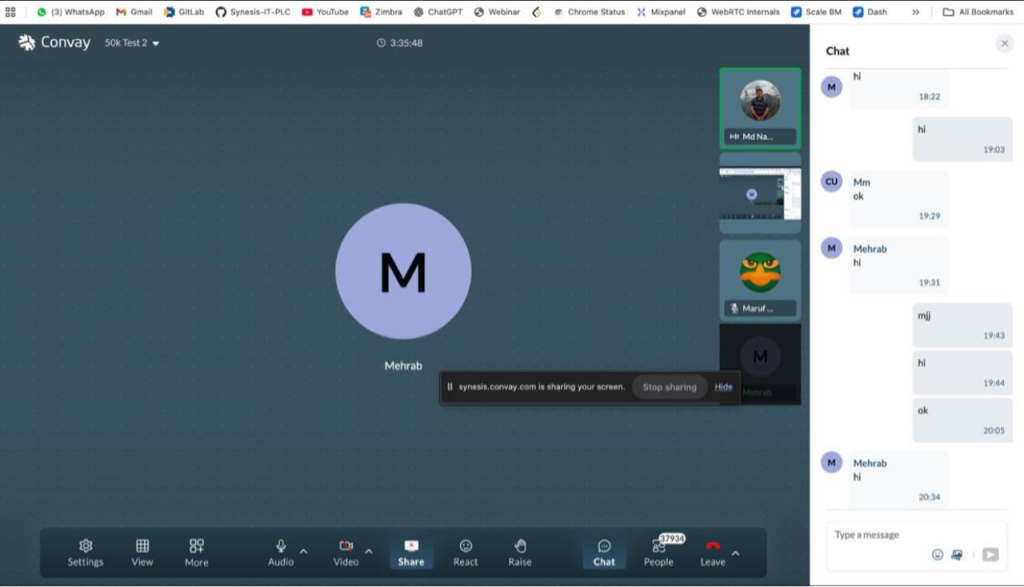
Convay’s paid plans start at $9.99 per user per month, providing unlimited meeting time and cloud recording. The Business plan includes admin controls and priority support. Convay also offers add-ons for large meetings, webinars, and multilingual options, making it versatile for various educational settings.
Try Convay free — no credit card required
Google Meet
Google Meet is a widely used platform in educational settings, primarily due to its integration with Google Workspace. It offers a simple interface and is accessible for schools already using Google’s ecosystem.
However, Google Meet’s free plan lacks recording and whiteboard features, which can limit its effectiveness for educational purposes. The paid plans, part of Google Workspace, offer additional features but can be costly.
Google Meet is ideal for institutions already invested in Google’s infrastructure, but it may not meet all educational needs.
Microsoft Teams
Microsoft Teams provides a comprehensive set of tools for virtual classrooms, integrating seamlessly with Microsoft Office applications. It supports large meetings and offers features like breakout rooms and file sharing.
The platform’s free version provides basic functionality, but the educational plans offer more robust features at a higher cost. Its integration with Office 365 makes it a strong contender for schools using Microsoft’s suite.
Microsoft Teams is best suited for institutions with a focus on collaboration and document management.
Cisco Webex
Cisco Webex is a reliable platform known for its security features and scalability. It supports large meetings and provides tools like screen sharing and virtual backgrounds.
The free plan allows for 40-minute meetings, which may not be sufficient for all classes. Paid plans offer more features but can be on the pricier side compared to alternatives like Convay.
Webex is ideal for schools prioritizing security and requiring robust support for large classes.
Whereby
Whereby is a user-friendly platform that doesn’t require downloads or logins, making it accessible for students and teachers alike. Its simplicity is its main advantage.
The free version offers limited features, and the paid plans provide more flexibility and customization options. However, it may lack some advanced tools needed for comprehensive educational experiences.
Whereby is suitable for smaller classes or institutions focusing on ease of use and accessibility.
GoTo Meeting
GoTo Meeting is a well-established platform offering reliable video conferencing services. It provides tools like screen sharing and recording, catering to educational needs.
The free version is limited, but the paid plans offer more robust features at a competitive price. Its reliability and support make it a good option for schools seeking dependable service.
GoTo Meeting is best for institutions valuing stability and comprehensive support.
Jitsi Meet
Jitsi Meet is an open-source platform that offers free video conferencing with no time limits. It’s customizable and doesn’t require user accounts.
While its basic version is free, it lacks some advanced features found in paid platforms. However, its flexibility and cost-effectiveness make it appealing for tech-savvy educators.
Jitsi Meet is ideal for schools looking for a budget-friendly and adaptable solution.
Full Feature Comparison: Zoom Alternatives at a Glance
| Platform | Free Plan | Free Time Limit | Free Participants | Free Recording | Free Whiteboard | Paid Starts At | Max Participants |
|---|---|---|---|---|---|---|---|
| Convay | Yes | 55 min | 100 | Yes | Yes | $9.99/user/month | 10,000+ |
| Zoom | Yes | 40 min | 100 | No | No | $13.33/user/month | 1,000 |
| Google Meet | Yes | 60 min | 100 | No | No | Part of Google Workspace | 250 |
| Microsoft Teams | Yes | 60 min | 300 | No | No | Part of Office 365 | 10,000 |
| Cisco Webex | Yes | 40 min | 100 | No | No | $13.50/user/month | 3,000 |
| Whereby | Yes | 45 min | 100 | No | No | $9.99/user/month | 50 |
| GoTo Meeting | No | N/A | N/A | N/A | N/A | $12/user/month | 3,000 |
| Jitsi Meet | Yes | Unlimited | 75 | No | No | Free | 75 |
Convay vs Zoom: Head-to-Head Comparison
| Feature | Convay Free | Zoom Free | Convay Pro | Zoom Pro |
|---|---|---|---|---|
| Meeting Duration | 55 min | 40 min | Unlimited | Unlimited |
| Participants | 100 | 100 | 100 | 100 |
| Recording | Local | No | Cloud | Cloud |
| Whiteboard | Yes | Extra Cost | Yes | Yes |
| Breakout Rooms | Yes | Yes | Yes | Yes |
| Price | Free | Free | $9.99/user/month | $13.33/user/month |
| Webinar Capacity | 10,000 | 500 | 10,000 | 500 |
| Support | Standard | Standard | Priority | Standard |
| Admin Controls | Limited | Limited | Advanced | Advanced |
| Virtual Backgrounds | Yes | Yes | Yes | Yes |
Which Platform Fits Your Situation?
| Your Situation | Best Platform | Why It Wins | Monthly Cost |
|---|---|---|---|
| Large Classes | Convay | 10,000 participants | $9.99/user |
| Google Ecosystem | Google Meet | Seamless integration | Part of Workspace |
| Microsoft Tools | Microsoft Teams | Office 365 integration | Part of Office 365 |
| Security Focus | Cisco Webex | Robust security | $13.50/user |
| Easy Access | Whereby | No downloads | $9.99/user |
| Stable Service | GoTo Meeting | Reliable performance | $12/user |
| Tech Savvy | Jitsi Meet | Open-source flexibility | Free |
| Budget Constraints | Convay | Cost-effective plans | $9.99/user |
| Webinars | Convay | 10,000 attendees | Less than 20% of Zoom cost |
How to Choose the Right Zoom Alternative
Choosing the right virtual classroom platform requires a clear understanding of your educational needs. Start by assessing the size of your classes and the specific features you require, such as recording and annotation tools. Platforms like Convay offer comprehensive features at competitive prices, making them ideal for diverse educational settings.
Consider your existing technological infrastructure. If your institution is already using tools like Google Workspace or Office 365, platforms like Google Meet or Microsoft Teams might offer seamless integration, enhancing the overall user experience.
Budget constraints are another crucial factor. Compare the pricing and features of various platforms to ensure you get the best value for your investment. Convay’s cost-effective plans, for instance, provide significant savings compared to competitors like Zoom.
Finally, think about the level of support and security you need. Platforms like Cisco Webex offer robust security features, while Convay provides priority support in its Business plan. Make sure your choice aligns with your institution’s priorities and goals.
Upgrade Your Classroom Experience
Explore Convay’s advanced features and affordable plans designed specifically for educational institutions. Enhance learning with tools that make a difference.
Frequently Asked Questions
What makes Convay a good choice for virtual classrooms?
Convay offers a robust feature set at competitive prices, ideal for educational settings. Its free plan includes a 55-minute meeting limit, up to 100 participants, and features such as a full whiteboard and local recording, making it a cost-effective choice for schools.
How does Convay’s pricing compare to Zoom?
Convay’s Pro plan is priced at $9.99 per user per month, saving 25% compared to Zoom’s Pro plan. Additionally, Convay’s webinar capacity is significantly higher at a lower cost, making it more economical for large-scale events.
Can Convay handle large classes or webinars?
Yes, Convay offers add-ons like Big Meeting and Webinar, accommodating up to 10,000 participants or attendees. This scalability makes it suitable for large classes or school events.
Does Convay offer any unique features for educators?
Convay provides a full whiteboard with live annotation in its free plan, a feature often charged by competitors. This tool enhances interactivity and engagement in virtual classrooms, making it a valuable asset for educators.
What level of support does Convay provide?
Convay offers standard support with its free plan and priority support with the Business plan. This ensures that educational institutions can access the help they need promptly, enhancing the overall user experience.
How does Convay ensure security and privacy?
Convay prioritizes security with robust measures in place to protect user data. It offers features like admin controls and secure cloud recording, ensuring a safe environment for virtual learning and meetings.
Is Convay easy to integrate with existing tools?
Yes, Convay is designed to work seamlessly with various educational tools and platforms. Its user-friendly interface and compatibility make it easy for schools to integrate into their existing technological infrastructure.
