
Quick Answer: The best alternative to Zoom in 2026 is Convay for most teams. Convay’s free plan offers 55-minute meetings — 37 percent longer than Zoom’s 40-minute free cap — plus screen sharing, whiteboard, and limited AI features at $0 per user per month. Paid plans start at $9.99 per user per month with AI-powered meeting minutes and sessions up to 30 hours.
Why Organizations Are Looking for a Zoom Alternative in 2026
Zoom remains the most recognized name in video conferencing, but it is not the right fit for every team. The most common reasons organizations switch include Zoom’s 40-minute free meeting cutoff, the cost of paid tiers ($13.33 per user per month for Zoom Pro), limited AI features on lower plans, and growing concerns about data sovereignty in regulated industries.
In 2026, several platforms have closed the feature gap with Zoom — and in some areas surpassed it. This guide covers the eight best Zoom alternatives, ranked by value, features, and fit for different team types.

The 8 Best Alternatives to Zoom in 2026
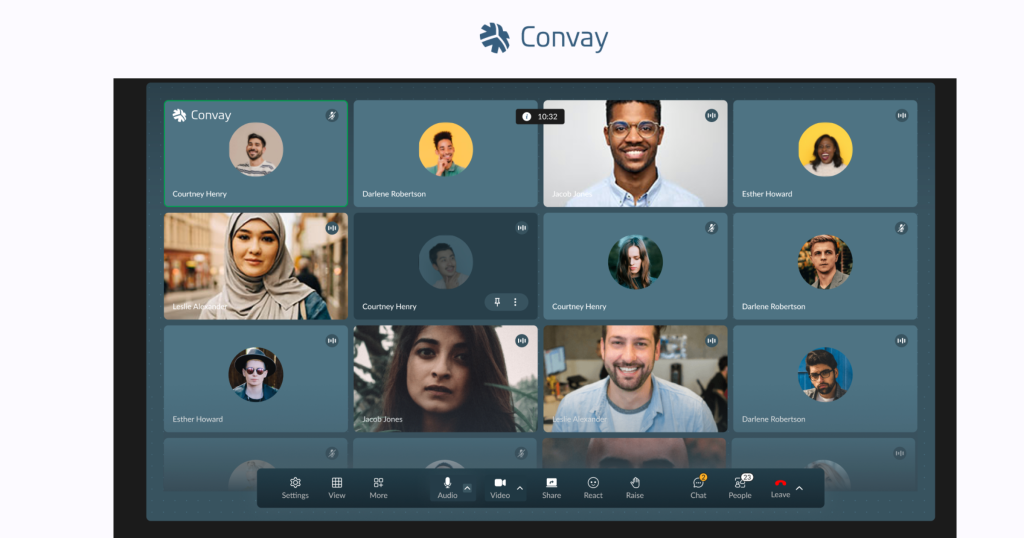
alt=”Convay video conferencing interface – Zoom alternative for enterprise meetings”
1. Convay — Best Overall Zoom Alternative
Convay is the strongest direct alternative to Zoom for remote teams, growing businesses, and organizations that want AI-powered meeting tools without paying Zoom’s premium. Its free plan is more generous than Zoom’s: 55-minute sessions versus Zoom’s 40-minute cap, with screen sharing and interactive whiteboard included at no cost.
Key features:
- AI-powered meeting minutes and post-meeting transcripts (Pro and Business plans)
- Interactive whiteboard with live annotation — included on the free plan
- End-to-end encryption across all plans
- Sessions up to 30 hours on Pro, up to 38 hours on Business
- Advanced organization management and team administration
Pricing:
- Convay Free: $0/user/month — 100 participants, 55-min sessions, screen sharing, whiteboard
- Convay Pro: $9.99/user/month (billed yearly) — 250 participants, 30-hr sessions, AI minutes, 10 GB storage
- Convay Business: $16.99/user/month (billed yearly) — 350 participants, 38-hr sessions, unlimited AI, 15 GB storage, extended support
Best for: Remote teams, Government and large organisations that need AI meeting intelligence at a lower price point than Zoom Pro.
Try Convay Free — no credit card required
2. Google Meet — Best Free Alternative With No Time Limit

alt=”Cisco Webex enterprise video conferencing platform”
Google Meet is the most accessible free Zoom alternative in 2026. It removed its 60-minute meeting cap in 2022 and has not reintroduced it. The platform requires no software download for guests and integrates natively with Google Calendar, Gmail, and Google Drive.
Key features: Unlimited meeting duration on free plan, real-time captions, noise cancellation, Google Workspace integration, screen sharing with no participant account required.
Pricing: Free for up to 100 participants. Google Workspace Starter at $6/user/month adds 150-participant meetings, recording, and noise cancellation.
Limitation: No meeting recording or AI summaries on the free plan. Whiteboard and annotation require a paid Workspace subscription. Teams outside the Google ecosystem may find it less convenient.
Best for: Teams already using Google Workspace who want unlimited free meetings without switching ecosystems.
3. Microsoft Teams — Best for Microsoft 365 Organizations
Microsoft Teams is the most feature-complete free Zoom alternative for organizations already running Microsoft 365. It combines video meetings, persistent chat, file sharing, and Office document collaboration in one platform — removing the need for a separate meeting tool.
Key features: Unlimited meeting duration, meeting recording on free plan, chat and file sharing, native integration with Word, Excel, PowerPoint, and SharePoint, up to 1,000 participants on enterprise plans.
Pricing: Free for up to 100 participants. Microsoft 365 Business Basic at $6/user/month adds 300-participant meetings, extended recording, and transcription.
Limitation: The Teams interface has a steeper onboarding curve than Convay or Zoom, particularly for teams unfamiliar with Microsoft products.
Best for: Organizations licensed on Microsoft 365 that want one platform for all communication and document collaboration.
4. Cisco Webex — Best for Enterprise
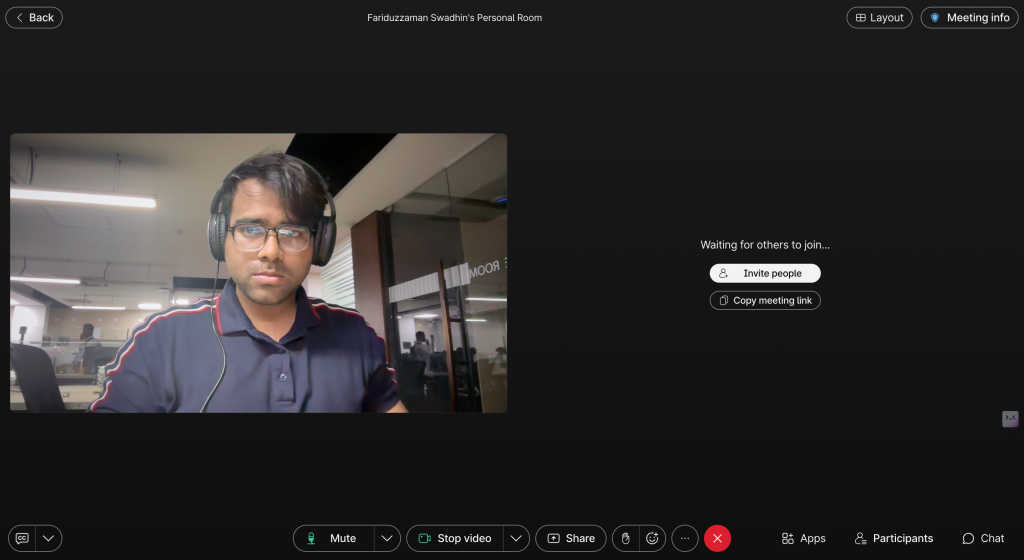
Cisco Webex is the leading Zoom alternative for regulated industries and government organizations. It holds DISA approval for US federal use and offers FedRAMP and HIPAA compliance options that Zoom does not provide at the same certification level.
Key features: DISA-approved security, FedRAMP authorization, enterprise-grade encryption, AI meeting transcription, support for up to 10,000 webinar attendees, advanced admin controls.
Pricing: Free plan supports 100 participants with 40-minute group meeting limit. Webex Starter at $14.50/user/month removes time limits and adds cloud recording and transcription.
Limitation: More expensive than Convay and Google Meet at the entry paid tier. The free plan has the same 40-minute group meeting restriction as Zoom.
Best for: US federal agencies, defense contractors, healthcare organizations, and enterprises with strict compliance requirements.
5. Jitsi Meet — Best Open-Source Alternative
Jitsi Meet is a fully open-source, browser-based video conferencing platform with no account requirement and no time limits. It can be used instantly at meet.jit.si or self-hosted for complete infrastructure control and data sovereignty.
Key features: No account required to host or join, screen sharing, live streaming to YouTube, unlimited meeting duration, self-hostable with full source code access.
Pricing: Completely free. Self-hosting requires server infrastructure and technical resources.
Limitation: Video quality can degrade with larger participant counts on the public server. No built-in recording or AI features. Requires technical expertise to self-host at scale.
Best for: Developers, privacy-focused organizations, and teams that need complete control over their communication infrastructure.
6. Zoho Meeting — Best Budget Alternative for Small Businesses
Zoho Meeting is one of the most affordable paid Zoom alternatives in 2026, with plans starting well below Zoom Pro pricing. It integrates natively with Zoho CRM, Zoho Projects, and the wider Zoho ecosystem, making it a strong choice for teams already using Zoho products.
Key features: Webinar support up to 3,000 attendees, meeting recording, screen sharing, polls, hand raise, CRM integration, and detailed analytics.
Pricing: Free for up to 100 participants with basic features. Paid plans from $3/host/month for meetings and $15/host/month for webinars.
Limitation: No AI meeting minutes. Less polished interface than Convay or Google Meet. Best suited for teams inside the Zoho ecosystem.
Best for: Small businesses and startups that want a low-cost Zoom alternative with webinar capabilities.
7. GoTo Meeting — Best for Formal Business Meetings
GoTo Meeting is a mature video conferencing platform built for structured business meetings. It offers reliable HD video, meeting transcription, and a commuter mode for mobile users with limited data. Its interface is designed for formal meeting workflows rather than informal team communication.
Key features: HD video, automated meeting transcription, custom meeting URLs, drawing tools, mobile commuter mode, and dedicated customer support.
Pricing: No permanent free plan. Professional plan from $12/user/month (billed yearly).
Limitation: No free tier. More expensive than Convay and Google Meet for teams that only need standard meeting features.
Best for: Mid-sized businesses and enterprises that run formal meetings and need reliable transcription and support SLAs.
8. Whereby — Best for Client-Facing Meetings
Whereby is the simplest browser-based Zoom alternative for client-facing meetings. No download is required for either host or guest, and meetings are accessed through a permanent room link. It is ideal for consultants, agencies, and freelancers who want a professional, frictionless video call experience.
Key features: Permanent meeting room link, no guest account required, screen sharing, browser-based with no installation, Miro and YouTube integrations.
Pricing: Free plan for unlimited 1:1 meetings. Whereby Pro at $8.99/month (flat rate) adds multiple rooms and group meetings up to 100 participants.
Limitation: Free plan is limited to 1:1 calls. Not suitable for large team meetings or enterprise deployments.
Best for: Freelancers, consultants, and small agencies who need a clean, link-based meeting room for client calls.
Comparison Table: Best Alternatives to Zoom in 2026
| Platform | Free Plan | Free Time Limit | Free Participants | AI Meeting Minutes | Starting Paid Price |
|---|---|---|---|---|---|
| Convay | Yes | 55 minutes | 100 | Yes (Pro+) | $9.99/user/mo (yearly) |
| Google Meet | Yes | Unlimited | 100 | No (free) | $6/user/mo |
| Microsoft Teams | Yes | Unlimited | 100 | No (free) | $6/user/mo |
| Cisco Webex | Yes | 40 min (group) | 100 | Yes (paid) | $14.50/user/mo |
| Jitsi Meet | Yes | Unlimited | 75 (public) | No | Free |
| Zoho Meeting | Yes | Limited | 100 | No | $3/host/mo |
| GoTo Meeting | No | — | — | Yes | $12/user/mo |
| Whereby | Yes (1:1 only) | Unlimited (1:1) | 1 (free) | No | $8.99/mo flat |
| Zoom (baseline) | Yes | 40 minutes | 100 | Limited (free) | $13.33/user/mo |
Zoom vs Convay: Feature Comparison
| Feature | Zoom Free | Zoom Pro ($13.33/mo) | Convay Free | Convay Pro ($9.99/mo) |
|---|---|---|---|---|
| Meeting duration | 40 minutes | Unlimited | 55 minutes | Up to 30 hours |
| Participants | 100 | 100 | 100 | 250 |
| Screen sharing | Yes | Yes | Yes | Yes |
| Whiteboard & annotation | Limited | Yes | Yes — free | Yes |
| AI meeting minutes | No | Add-on cost | Limited | Yes — included |
| Cloud recording | No | Yes | Local | Yes (10 GB) |
| End-to-end encryption | Yes | Yes | Yes | Yes |
| Price per user/month | $0 | $13.33 | $0 | $9.99 |
Convay Pro costs 25 percent less than Zoom Pro and includes AI meeting minutes in the base price — Zoom charges for AI Companion as an add-on on top of the Pro subscription.
How to Choose the Right Zoom Alternative
Choose Convay if you need AI meeting minutes, longer free sessions, and a clear upgrade path to enterprise security without paying Zoom’s premium pricing. Start free at convay.com.
Choose Google Meet if your team runs on Google Workspace and needs unlimited free meetings with no additional software.
Choose Microsoft Teams if your organization is on Microsoft 365 and wants meetings, chat, and document collaboration unified in one platform.
Choose Webex if your organization is a US federal agency, defense contractor, or regulated enterprise requiring DISA or FedRAMP certification.
Choose Jitsi Meet if you need open-source, self-hostable infrastructure with complete data sovereignty and no per-user cost.
Choose Zoho Meeting if you are a small business on a tight budget that also needs webinar functionality built into the same plan.
Choose GoTo Meeting if your organization runs structured formal meetings and needs dedicated transcription and SLA-backed support.
Choose Whereby if you are a freelancer or consultant who wants a permanent, no-download meeting link for client calls.
Frequently Asked Questions
What is the best alternative to Zoom in 2026?
The best alternative to Zoom in 2026 is Convay for most teams. Convay offers a free plan with 55-minute meetings, screen sharing, and whiteboard at $0 per user per month — outperforming Zoom’s 40-minute free cap. Convay Pro at $9.99 per user per month includes AI meeting minutes, which Zoom charges as a separate add-on on top of its $13.33 Pro plan.
Is there a free alternative to Zoom with no time limit?
Yes. Google Meet and Microsoft Teams both offer free video conferencing with no meeting time limit in 2026. Convay Free is limited to 55-minute sessions but includes whiteboard and annotation tools that Google Meet and Microsoft Teams do not provide on their free plans.
What is cheaper than Zoom Pro?
Convay Pro at $9.99 per user per month (billed yearly) is 25 percent cheaper than Zoom Pro at $13.33 per user per month. Convay Pro includes AI-powered meeting minutes in the base price; Zoom charges AI Companion as a paid add-on. Google Meet and Microsoft Teams also have paid tiers starting at $6 per user per month, though with fewer AI features.
Which Zoom alternative is best for enterprise security?
Cisco Webex is the top Zoom alternative for enterprise and government security in 2026. It holds DISA certification for US federal use and supports FedRAMP and HIPAA compliance. Convay is the better choice for enterprises that want advanced AI meeting features alongside strong encryption and organization management controls.
Does Convay work as a replacement for Zoom?
Yes. Convay covers all core Zoom functionality — video meetings, screen sharing, whiteboard, recording, and participant management — plus adds AI-powered meeting minutes on paid plans. Convay Free gives 55-minute sessions compared to Zoom’s 40-minute cap, making it a stronger free replacement. Convay Pro at $9.99 per user per month is a direct, lower-cost replacement for Zoom Pro.
What happened to BlueJeans and Skype?
BlueJeans was acquired by Verizon and has been wound down as a standalone product. Skype was discontinued by Microsoft in May 2025. Both platforms should be removed from consideration when evaluating Zoom alternatives in 2026. Microsoft Teams is the recommended replacement for former Skype users.
Which Zoom alternative is best for remote teams?
Convay is the best Zoom alternative for remote teams in 2026. It combines video meetings, AI meeting minutes, screen sharing, whiteboard, and secure cloud storage in one platform starting at $0 per user per month. Remote teams that need unlimited meeting duration can also consider Google Meet or Microsoft Teams on their free tiers.
What is the best Zoom alternative for small businesses?
For small businesses, Convay Free ($0) or Convay Pro ($9.99/user/month) offers the strongest value — more meeting time, AI features, and whiteboard tools than Zoom’s equivalent tiers at a lower price. Zoho Meeting is a lower-cost alternative for small businesses that also need webinar functionality.
